Jia’an · Four in a Row
Drop discs into columns and connect four horizontally, vertically or diagonally. Choose a 7×6 or 8×7 board.
Jia’an · Reversi · Beginner's Guide
An illustrated D3 opening explains legal captures, compulsory passes and final counting, then shows why corners deserve care.
Prepared by:Jia'an Board & Card Games · Updated
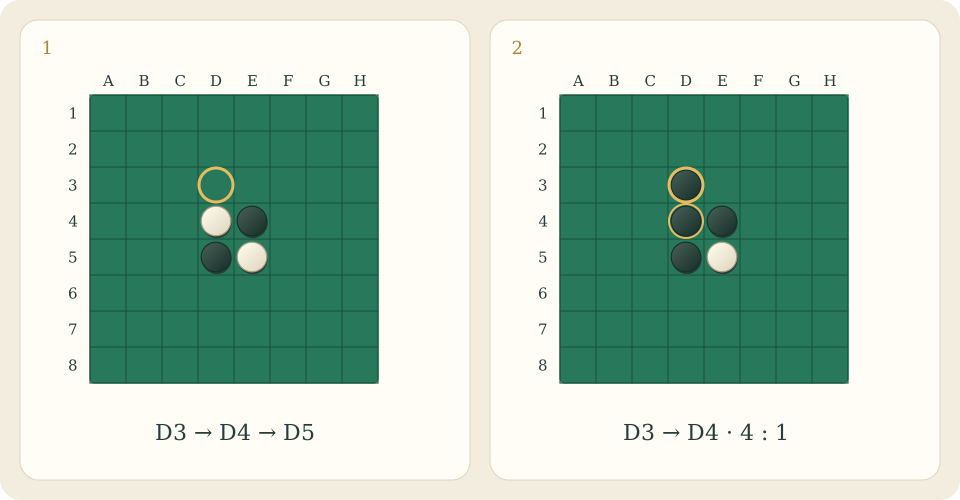
The 8×8 diagram labels columns A–H and rows 1–8 from top to bottom. Initially White occupies D4 and E5; Black occupies E4 and D5. Black plays D3, bracketing White’s D4 between D3 and D5. Only D4 flips, leaving four black discs and one white disc.
Flipping is automatic, without another click. Two discs of your colour anywhere on the board do not create a capture at any time: the newly placed disc must complete an unbroken straight line. You cannot jump a gap or your own disc to flip beyond it.
A corner connects to the board in only three directions, with no outside square for an opposing disc to complete a bracket. An occupied corner therefore cannot be flipped. Be cautious beside empty corners: some moves offer the opponent access. Still, do not replace analysis with a slogan; check whether the opponent actually has a legal line into that corner next.
Passing is permitted only when you have no legal move, and the game handles it automatically. Your opponent may consequently play two or more times in succession. Count discs only once neither player can move. If either side still has a legal move, a large temporary lead does not end the game.
Ready for something different? Open another game below, or read its rules before you begin.
Drop discs into columns and connect four horizontally, vertically or diagonally. Choose a 7×6 or 8×7 board.
Choose international 10×10 or English 8×8 draughts: compulsory jumps, multiple captures and promotion, against AI or a local friend.
Standard 15-checker backgammon with dice, hits, re-entry and bearing off. Choose a classic game or doubling cube, versus AI or locally.